Scalable Distributed Web Scraping with Celery
Introduction
Web scraping is fairly simple with a small amount of data, but processing becomes challenging as the number of pages and products grows.
I faced this while building a scraper for a large number of product pages. My initial approach processed everything sequentially, which made the process slower than I wanted.
In this article, I'll show how I used Celery, Redis, and multiple workers to process independent scraping tasks concurrently.
Architecture Overview
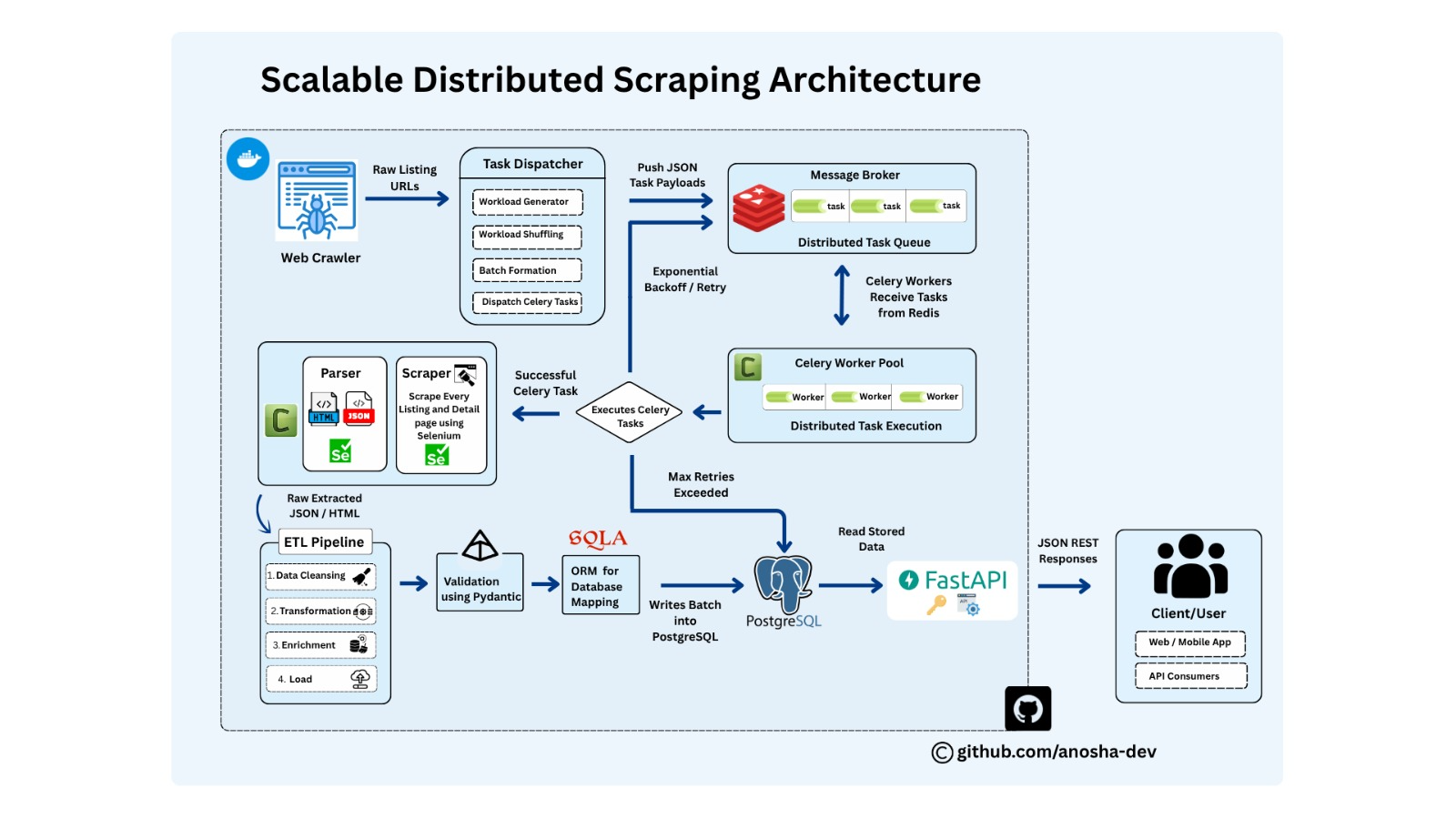
The architecture above shows the complete scraping pipeline, from URL discovery and task dispatching to distributed task execution, data processing, validation, storage, and API access.
Problem Statement
Initially, I was scraping around 1,000 products, including listing and detail pages. Processing them sequentially took roughly 10 minutes.
While this worked for a small dataset, the same approach would take much longer with thousands or millions of products.
Since the scraping tasks were independent, I needed a way to distribute and process them concurrently.
How can we distribute independent scraping tasks and process them concurrently?
This is where Celery comes in.
The Sequential Approach
Before introducing Celery, my scraper processed each product one after another. The next product started only after the previous one finished.
Processing one task at a time results in longer processing times.
This approach is simple, but it becomes inefficient when many tasks can run independently.
The Need for Concurrent Processing
A product can usually be scraped independently of other products, allowing multiple scraping tasks to run concurrently.
Processing multiple tasks concurrently can reduce the overall processing time.
The challenge is managing, distributing, and executing these tasks across multiple workers.
That's where Celery helps.
What is Celery?
Celery is a distributed task queue that allows Python applications to execute tasks asynchronously and distribute them across multiple workers.
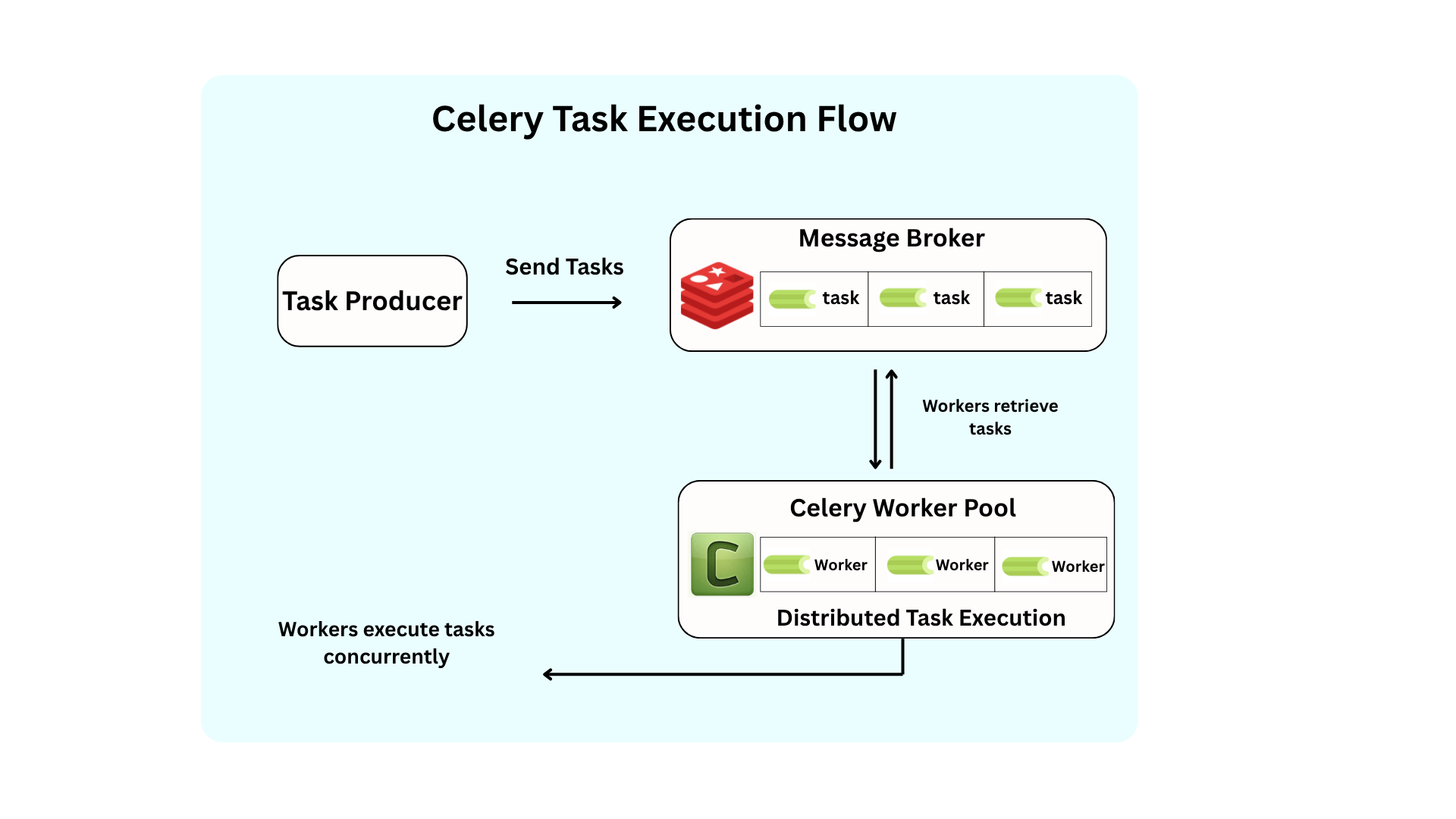
Instead of handling every scraping task directly, the application can create tasks and send them to a queue. Celery workers then retrieve and execute them.
In simple terms:
The application creates tasks.
The message broker holds the tasks.
Workers execute the tasks.
How Does Celery Work?
Celery distributes tasks from an application to available workers. Tasks are sent to a message broker, where they wait until a worker retrieves them.
The basic workflow is:
The application creates and sends a task to the broker.
The broker holds the task until a worker is available.
A worker retrieves and executes the task.
After completing it, the worker can pick up another task.
Multiple workers can process independent tasks concurrently.
In my setup, Redis is used as the message broker.
Celery Components
Celery uses several components to manage and execute tasks.
Task
A task is a Python function that Celery can execute asynchronously.
@app.task
def perform_task(data):
    # Task logic
    ...
The @app.task decorator registers the function as a Celery task.
Message Broker
The message broker acts as a middleman between the application and workers. It receives task messages and makes them available to workers.
Celery supports brokers such as Redis and RabbitMQ.
Redis
Redis is an in-memory data store that can also act as a message broker.
In my setup, Redis holds and delivers task messages between the application and Celery workers.
Redis and Celery are not the same thing. Celery manages task execution, while Redis acts as the message broker.
Worker
A worker is a process responsible for executing Celery tasks.
Multiple workers allow independent tasks to be processed concurrently.
Let's Understand It with Our Scraper
Now let's apply these concepts to the scraper.
Instead of processing every product directly, I changed the scraping operations into Celery tasks.
The scraper first discovers product URLs from listing pages and sends them to Redis as tasks. Celery workers then retrieve these tasks and scrape the corresponding detail pages.
Once a worker finishes a task, it can pick up another one from the queue.
This changed the scraper from a sequential process into a distributed and concurrent workflow.
Creating the Celery Application
First, we create a Celery application and configure Redis as the broker and result backend.
from celery import Celery

app = Celery(
    "app",
    broker="redis://localhost:6379/0",
    backend="redis://localhost:6379/0"
)
Here:
brokerconfigures Redis as the message broker.backendconfigures Redis as the result backend.
The broker handles task delivery, while the result backend stores task results and status.
Creating a Celery Task
We can now turn the scraping operation into a Celery task:
@app.task
def scrape_product(url):
    # Open the product page
    # Extract the required information
    # Save the data
    ...
The @app.task decorator registers the function as a Celery task.
We can send a task using .delay():
scrape_product.delay(url)
This sends the task to the broker for asynchronous execution.
Running Celery Workers
Creating tasks is only part of the process. We also need workers to execute them.
We can start a Celery worker with:
celery -A app worker -l info
Once the worker is running, it waits for tasks to arrive in the queue.
We can also configure multiple worker processes to handle more tasks concurrently.
celery -A app worker -l info --concurrency=4
This allows multiple tasks to be processed concurrently.
The appropriate concurrency level depends on the workload and available resources. In my case, Selenium made this especially important because each worker could consume significant memory.
Handling Failed Tasks
Web scraping can fail due to network problems, timeouts, temporary server errors, unavailable pages, or unexpected data.
Celery can automatically retry failed tasks:
@app.task(
    autoretry_for=(Exception,),
    retry_kwargs={"max_retries": 3}
)
def scrape_product(url):
    # Scraping logic
    ...
This allows temporary failures to be retried without interrupting the entire workload.
Repeated failures can also be recorded for later investigation.
Scaling the Scraper
Once the scraping work was converted into independent tasks, I could scale it by increasing the number of Celery workers.
Workers can run on the same machine or across multiple machines, allowing the system to scale horizontally.
Scaling Trade-Off
Adding more workers can increase concurrency and reduce processing time, but it also increases resource consumption.
More workers : higher concurrency and potentially faster processing.
Too many workers : higher CPU and memory usage, which can reduce performance or exhaust available resources.
This became particularly noticeable in my scraper because each worker could run a Selenium browser instance.
The goal is not to use as many workers as possible, but to find the right balance between concurrency and available resources.
When I increased the number of workers, memory eventually became a limitation. Scaling therefore requires balancing concurrency with available
system resources.
How Celery Changed the Scraper
Now let's apply these concepts to the scraper.
Initially, the scraper processed URLs sequentially, with each task waiting for the previous one to finish. As the workload increased, this became a bottleneck.
I converted the scraping operations into independent Celery tasks and dispatched them to Redis. Multiple Celery workers could then retrieve and execute these tasks concurrently instead of processing them one at a time.
This changed the scraper from a sequential workflow into a distributed and concurrent task-processing system, making the workload more scalable and efficient.
Key Benefits
Asynchronous task execution without blocking the main application.
Concurrent processing of independent scraping tasks.
Task distribution across multiple workers.
Automatic retries for temporary failures.
Failure isolation between individual tasks.
Scalability by adjusting the number of workers based on available resources.
Connect with me:
Github: https://github.com/anosha-dev
LinkedIn: www.linkedin.com/in/anosha-dev